
The sensible use of AI in UX design

This week at CTI we’ve been talking about compassionate and accessible UX in a world of robots. Or, to put it plainly, how AI tools can improve the work of a UX team without introducing bias, flattening nuance or abdicating our responsibility to actual humans.
In effect, generative AI tools have brought to a head the conversation (and tension?) that has always existed in UX. Namely, how do we square quality with efficiency? Or, how do we align compassion and commercials?
Wherever you work in your organisation, you’ll have encountered this dynamic. We can use AI to get stuff done quickly, but that doesn’t mean it’s always good. The AI needs to be fit for purpose, to have the proper context, and then the output needs to be validated, edited, humanised. If this isn’t done properly, any time savings in your UX project simply become additional time that end users need to spend dealing with uncanny or inaccessible content.
In our recent webinar, CTI Lead Designer Dalton Weir made this wider point with a quote from author and software engineer Tom DeMarco, who wrote:
"Quality takes time and reduces quantity, so it makes you, in a sense, less efficient. The efficiency-optimized organization recognizes quality as its enemy."
Perhaps the simplest way to summarise this introduction is that, in the world of UX, not everything can be automated.
Not everything can be automated
There are many tasks where AI can help UX teams. Prototyping, asset creation, accessibility support, research synthesis, user testing analysis, design system governance – the list goes on.
Then there are tasks that are human by definition. Ethical and brand oversight, high-stakes decision making, validation with real users, strategic compassion, and so on.
Weir contends that if AI is used correctly, there’s a blended approach that makes sense. This is the middle section of a venn diagram where humans can ideally use AI to achieve ‘validated velocity’, ‘informed iteration’, ‘scalable accessibility’ and ‘risk-mitigated growth’ (see figure 1).
However, if AI is used in the wrong way, it can create false confidence that ultimately ends up costing the business.
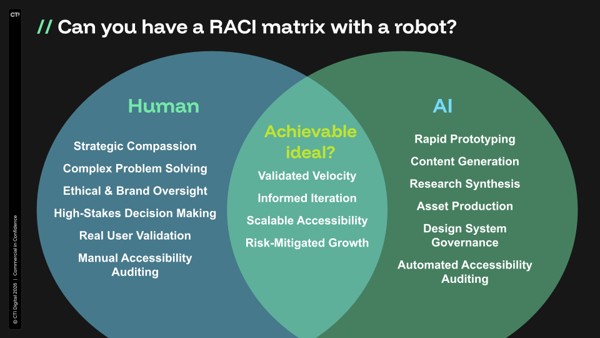
Figure 1: Which UX tasks can be performed by an AI, and which only by humans?
The commercial danger of false confidence
What is the cost of UX design at scale?
The UX and strategy teams at CTI have a favourite chart that illustrates the increasing cost of errors, the later they appear in product development (inspired by Barry Boehm’s cost-of-change curve from the 1980s).
In the traditional approach to product development, failing fast (or testing early) helps to keep costs low – it’s cheaper than finding an error in production (see figure 2).
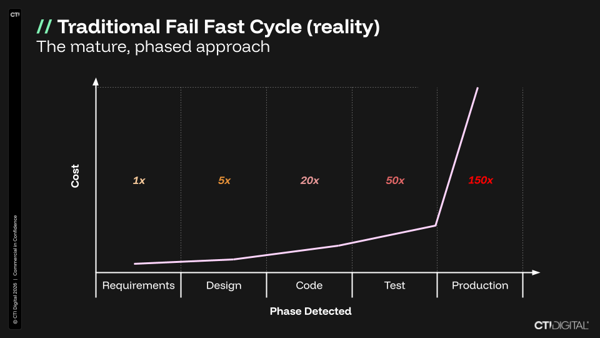
Figure 2: A version of the cost-of-change curve
The relationship shown in this cost curve is fairly self-evident – it’s the reason that requirements are gathered in the first place. There’s also a flatter version of this curve (closer to linear than exponential) where Agile methodologies and their frequent feedback loops help to reduce the cost of change.
But what we’re really interested in, in this thought experiment, is creating an imagined version of this cost curve which shows the worst case scenario for businesses in the grip of AI fever. Figure 3 below shows how, hypothetically, if design and product teams use AI to jump straight to production, they lose the chance to validate and course correct, and any errors will be seen under the full glare of go-live.
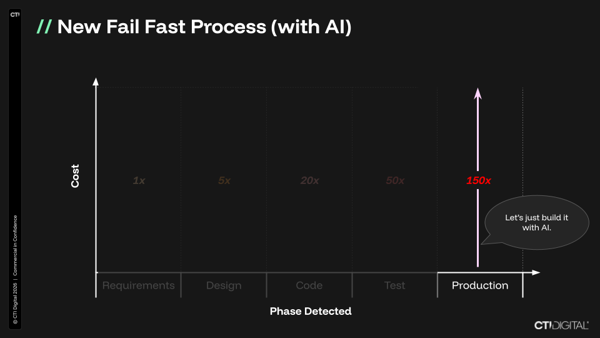
Figure 3: AI’s hypothetical impact on the cost-of-change curve
Beware of AI echo chambers
The risk in these cases for UX design is usually not that AI is obviously wrong; rather that it can make untested ideas feel polished, credible and ready for decision-making.
We’re all familiar with the concept of work slop, and it appears on a sliding scale.
There’s plenty of research that points to the danger of AI echo chambers in UX:
-
Synthetic users can be shallow and overly favourable, according to a study by Nielsen Norman Group.
-
Higher confidence in GenAI was associated with less critical thinking among knowledge workers in a Microsoft study.
So, what does AI mean for the CTI UX team?
At CTI we’ve added various UX skills to our own AI assistant, built on open-source LLMs and hosted privately.
These include a UX Sales & Research Assistant, which can run a client-facing UX health check (based on a set of UX standards) on a website URL. It produces a report, with a clear scope and to a required tone or structure, with the most visible UX opportunities and observations, along with sensible next steps (such as a UX discovery sprint).
We can tell this AI how to frame the value in its findings. And there are other modes we can run, including an accessibility risk snapshot, competitor UX benchmark, content clarity audit, and so on.
One use case proving useful is a tender analysis function. This mode analyses prospective client tenders, RFPs and procurement briefs; it extracts requirements, identifies scoring priorities, maps CTI services to the tender need and recommends a credible delivery approach aligned to Double Diamond or Lean design principles.
There are of course some important caveats to add here:
-
Our LLM functionality chiefly helps us with triaging opportunities and with sales support.
-
The UX team always validates findings to ensure they are evidence-based, user-focused, and proportionate.
-
At CTI we have an AI policy which dictates how we review and log any client work where AI tools have been used meaningfully in a project (alongside a clear client opt-out).
Used in the right way, Lead Designer Weir identifies three main benefits of AI tools in UX, when used responsibly.
1) Changing priorities (or, time back for important stuff)
AI can help with pixel pushing, data consolidation and document writing, all of which is time that can be used for speaking with users and uncovering challenges.
2) More flexible outputs (interactive, interrogable)
Gone are the days of flat, boring designs. We can now produce designs in code at scale and speed that provide clients with something clickable and developers with a head start.
3) Greater service diversity
The UX team can now expand into other value-add services that we historically wouldn’t have had access to (due to higher priority services). We can now deliver brand design, a full user research suite, interactive animation work, and much more.
The future is already here…
You can find lots of examples of tech companies that are using AI in UX design. The tech is already making a difference, but again – you’ll see how clearly it is caveated.
Github, for example, built their own general purpose accessibility agent designed for “catching and automatically remediating simple, objective accessibility issues before they go to production.” In a blog post about the tech, senior designer Eric Bailey writes, “Much like with any other specialized domain area, vague instructions in a skill file won’t cut it. Telling an LLM to “use accessibility best practices” with a short list of examples won’t work well.”
At Trello, too, Designer Director Joel Unger is vibe coding prototypes using Figma screenshots – not to push to production, but to improve communication between designers and devs. Unger can create a video of himself using the prototype, which brings much more clarity to design hand-offs, rather than trying to describe breakpoints (in this example) using only words and static images.
Ultimately, the argument is that AI should help UX designers get stuff done, which is at the heart of compassionate design. Sympathy and empathy are laudable – acknowledging difficulty, and putting ourselves in users’ shoes – but compassion requires an operational response to identified user challenges.
If you are interested in talking to our UX team about their approach, get in touch.

CTI Digital's team of digital marketing and technology experts specialise in digital strategy, web development, and growth marketing. We help ambitious brands navigate the digital landscape with proven strategies and cutting-edge technical expertise.