
Why we use N8N to automate A/B test reporting in our CRO team

Running an A/B test properly takes ongoing care and attention – gathering data, tracking progress against your test schedule, and knowing when a result is statistically significant enough for your team to act on.
Our Innovation Team built A/B test reporting automations to handle that tracking automatically across every client test. By automating the process, we take the onus of platform admin off the Conversion Rate Optimisation (CRO) Team, freeing them up to think deeper about strategy.
The challenge
Every A/B test used to need its own manual admin. Across a full client roster, that added up to 40+ hours a month. The CRO team spent those hours pulling GA4 data, running statistical analyses, and compiling reports.
“Before we had this automation, collecting results and determining a winner involved setting reminders, manual checks, and inputting the data into various tools to determine sample size, significance, and power,” said Lee Preston, Head of CRO at CTI Digital.
On top of this work, for every manual action that occurs during reporting, there were the wider concerns of scalability and the potential for human error or inconsistency.
The solution
The Innovation Team built a fully automated pipeline, orchestrated in N8N, connecting GA4, Analytics Toolkit, Google Sheets, and Gmail. We’ve nicknamed it the A/B TestPilot, and it starts the moment a member of the CRO Team fills out a short form for a new test.
1. CRO Team submits form
Filling in test name, client, GA4 property ID, variant audience names, Analytics Toolkit test ID and start date. Time: 2 minutes.
2. Row saved to Google Sheet
Form data saves automatically to the master test-registry sheet. No manual data entry.
3. Daily trigger fires at 10.30am
Schedule Trigger checks the sheet each morning. Start-day matching logic ensures each test only reports on its own day of the week.
4. GA4 data pulled per variant
Three parallel GA4 API calls pull ‘Control’, ‘Variant A’ and ‘Variant B’ from the correct property.
5. Analytics Toolkit verdict
Cumulative data pushed to Analytics Toolkit API. Returns ‘ContinueSampling’, ‘StopAndWinner’ or ‘StopAndLoser’ based on sequential analysis.
6. Email sent automatically
Weekly report fires with CVR, lift and recommended action. Final report fires when a winner is declared — sheet status updates to completed.
A fully dynamic build
The build is fully dynamic, with no hardcoded client details. Google Sheets drives the configuration, so the same pipeline scales across clients without needing a rebuild for each one.
"Except for inputting some initial data, we get weekly reminders of test progress in our inboxes, including the client, and it plugs into Analytics Toolkit's API so it'll tell us if we’ve passed any thresholds for stopping tests early," said Preston.
The results
Around 4 hours saved per A/B test.
Live and running for a number of clients, each of whom receives branded reports to their inbox every week. This gives them visibility into how a test is progressing throughout, rather than only finding out the result once it's over.
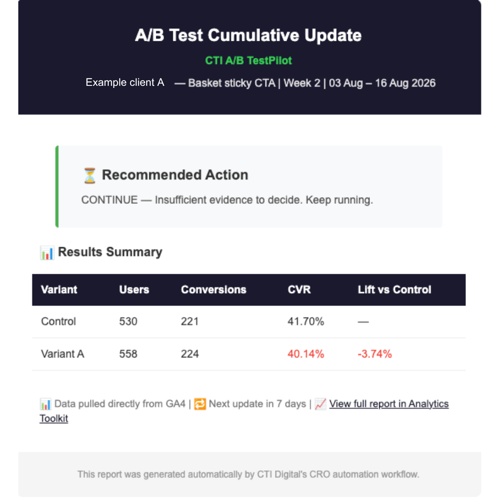
See an example below of a "Basket sticky CTA" test, with the A/B TestPilot correctly returned a ‘continue’ verdict, flagging insufficient evidence rather than a false-positive call.
Next steps and learnings
At CTI, we plan to continue rolling out the A/B Testpilot to our clients. And we plan to extend beyond A/B testing, using the same GA4 + Sheets-driven pattern to support other reporting needs, not just significance testing.
If you have any questions for our CRO Team, please feel free to get in touch.

CTI Digital's team of digital marketing and technology experts specialise in digital strategy, web development, and growth marketing. We help ambitious brands navigate the digital landscape with proven strategies and cutting-edge technical expertise.